Speed Hack & Noclip Script for The Strongest Battlegrounds
Download a keyless script for The Strongest Battlegrounds (TSB) with Speed Hack, Noclip, and auto-dodge features. It works on both PC and mobile devices.
Speed Hack
Noclip and Auto-Dodge
Does this script require a key?
No. This script is keyless and can be used without a key system.
Which devices are supported?
The script works on PC and mobile devices.
Which injectors are compatible?
It is compatible with the Delta and Xeno injectors.
Speed Hub X - The Strongest Battlegrounds Roblox Cheat
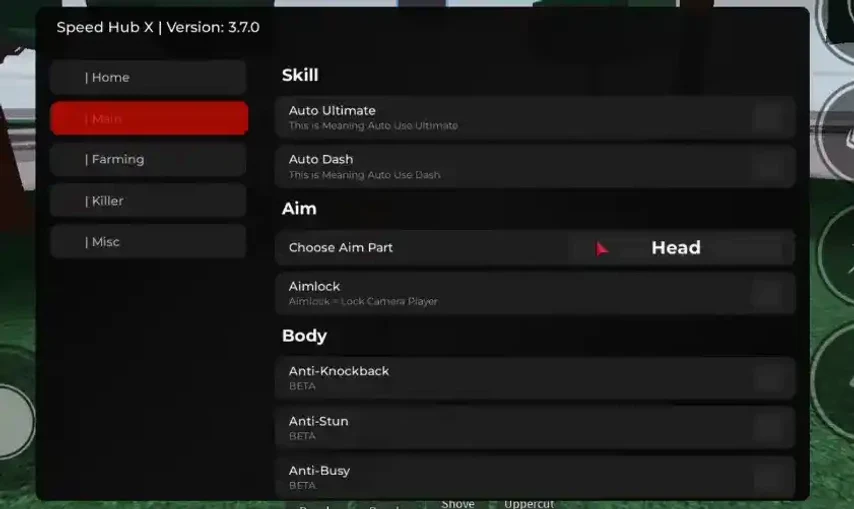
Speed Hub X is a powerful keyless script for The Strongest Battlegrounds in Roblox. It includes combat tools, movement options, and utility features such as NoClip, Auto Dash, and more.
Walkspeed
NoClip
Jump Power
Anti-Stun
Anti-Knockback
Auto Dash
Auto Ultimate
Auto Block
Safe Mode
Auto Kill
Teleport
Is Speed Hub X keyless?
Yes, Speed Hub X is available without a key.
Which Roblox injectors support this script?
It is compatible with Arceus X Neo, Delta, Xeno, and Solara.
What features does the script include?
The script offers movement, combat, defense, teleport, and automation features, including NoClip, Auto Block, Auto Kill, and Auto Ultimate.
Gojo Script v3 - The Strongest Battlegrounds Roblox
Gojo Script v3 is a keyless script for The Strongest Battlegrounds in Roblox. It includes invisibility, cooldown removal, anti-stun support, and more gameplay options.
Anime Teleport
Invisibility Mode
Ultimate Move Detector
Dash Cooldown Removal
Anti-Stun Mode
Gojo Animation Pack
Super Senior Gojo Quotes
Realm Rampage Auto Clash Win
Sans Move Set
A-Train Move Set
Toji Move Set
Does Gojo Script v3 require a key?
No. This script is keyless and can be used without a key system.
Which Roblox injectors are compatible?
It is compatible with Arceus X Neo, Delta, Xeno, and Solara.
What does the script include?
The feature list includes invisibility, anime teleporting, move detection, no dash cooldown, anti-stun mode, Gojo animations and quotes, plus Sans, A-Train, Toji, and Realm Rampage options.
getgenv().morph = true -- turn false to true if you want custom accessories
loadstring(game:HttpGet("https://raw.githubusercontent.com/skibiditoiletfan2007/BaldyToSorcerer/refs/heads/main/LatestV2.lua"))()
No scripts match these filters
TSB SCRIPTS
Compare
Select two or three scripts to compare their listed features.
The Strongest Battlegrounds in Roblox: Fighting, Blocking and Dashing
TSB combat basics: ordinary controls versus script tools
The Strongest Battlegrounds is a Roblox fighting experience by Yielding Arts. Its recognizable rhythm comes from short exchanges: approach an opponent, choose an attack, read a response, then decide whether to block or dash. The official controls describe punching, blocking, dashing, running and an ultimate mode. Those ordinary game actions are the starting point for understanding the names used by third-party script menus. A menu label is easier to judge when you know which part of an exchange it proposes to change.
TSB Scripts brings code listings and practical explanations together. Start with the catalog above when you want a particular entry; use this guide when you need to distinguish similar features. A script is separate from the game itself. It is not a Roblox redeem code, an official character purchase or a promise that a particular action will work. The official game page is the place to confirm the experience and its current description. A script listing has its own requirements, which should be read separately.
Timing, attack sequences and character requirements
Auto Block and Auto Combo concern different decisions. Auto Block describes an attempt to trigger a defensive response under conditions chosen by the script author. Auto Combo describes a sequence of actions. A script may include one without the other, and a combined menu may still need separate settings for each. Neither name tells you which attacks are recognized, how targets are selected or whether the chosen character is supported.
Consider a simple exchange in which an opponent closes the distance while your current move is still running. A defensive option may depend on whether blocking is available at that moment. A combo option may depend on the opponent remaining in reach for the next action. These are separate limits. A larger feature list does not remove them. Read the description for activation conditions, required moves and any documented exclusions before comparing entries. Use the combat guide for a closer explanation of blocking, dodging, repeated attacks and action sequences. The comparison table marks missing information as not specified instead of treating silence as confirmed support.
What to compare
Meaning and useful question
Auto Block
Defensive response. Which incoming actions and activation conditions does the author describe?
Auto Combo
A sequence of actions. Which starting position and existing moves are required?
Auto Attack / Auto Farm
A repeated action or a broader cycle. What starts, stops and changes the target?
Aimlock / ESP
Target or camera assistance versus information overlays. Which behavior is actually listed?
Identify the exact entry and the function you want to understand before comparing names.
Read the stated device, character and input requirements as separate conditions.
Check whether the claim describes the menu, a visual effect or a game action.
Review access requirements and the full code before choosing Copy or Download.
Auto Attack usually refers to repeating an individual offensive action. Auto Farm is a broader name and can describe a cycle involving target selection, movement and repeated actions. The name alone does not reveal the cycle. In a TSB listing, look for an explanation of what begins it, what ends it and what happens when the current target disappears. Do not import expectations from unrelated collection or currency games.
Aimlock and Aimbot are also labels that need context. One entry may describe keeping the camera pointed at a target; another may describe a target selection aid. Camera orientation, an animation playing and an attack connecting are different events. A target outside range can remain visible without becoming hittable. When choosing between two entries, compare the described task rather than counting menu rows. An unknown target rule is a useful question for the author, not a reason to assume the feature chooses the nearest opponent correctly in every situation. No automation label establishes a guaranteed result in a match.
The Strongest Battlegrounds Moveset Scripts
Custom animations are not the same as character unlocks
A custom moveset can change the way a character appears to move. That can include different animations, trails, camera effects or the presentation of a sequence. These changes may be enjoyable as visual experiments, but their scope matters. An animation that resembles a different fighter does not by itself unlock that fighter, grant a paid ability or change what the server accepts as damage.
Look for a description that separates appearance from actual actions. Does it replace a movement animation? Does it require a particular existing character? Are effects visible only on your device, or is wider visibility explicitly documented? A thumbnail cannot answer these questions. Compare what the author says with any separately described test conditions. If a condition is not stated, leave it undecided. The movesets guide explains these distinctions in more detail. It also helps separate a visual sequence from Auto Combo: one concerns presentation, while the other concerns the order of attempted actions. Similar-looking clips can show very different kinds of changes.
ESP generally concerns information drawn on the screen, such as player names, position markers or distance labels. The exact overlays depend on the entry. A marker can help explain where a player is represented in the scene, but it does not grant permission to hit that player or change the server's visibility rules. Read which labels the author actually lists instead of assuming every familiar ESP option is included.
Movement and camera settings deserve their own checks. Speed is about movement behavior; FOV changes the field of view. A wider view can alter how fast motion feels without changing movement speed. Combining visual settings may also make a small screen harder to read. Prefer a short list of understood options to a crowded menu whose effects are unclear. The Visuals and Movement filters use the information attached to each entry. Scripts without a clear category remain available in the full catalog.
TSB Scripts Without a Key
Script keys and executor keys are different
The No Key badge refers to the script entry. It means the source describes that script as not requiring its own key system. An executor is a separate tool and may have independent access conditions. A keyless script therefore does not make every possible executor keyless, free or compatible.
Reading or copying code on this site is free. That describes obtaining the text here, not the price or terms of unrelated services. A visible code listing can still show a key prompt after being used elsewhere if the source has such a requirement. Check the badge and description together. If they contradict the behavior you observe, report the entry and the wording of the prompt without sending the key itself. This site does not provide ways to bypass access systems. Use the No Key filter only when that specific distinction matters to your choice.
TSB Scripts on Android, iOS and Windows PC
Delta, Xeno and Solara requirements for TSB
Android: begin with the stated script and executor requirements, then consider touch interaction. A menu designed around a keyboard shortcut may need a documented touch control. The size of buttons, the ability to move a window and the position of game controls all affect usability. Roblox running on your phone only confirms access to the game, not support for a separate script or all of its features.
iPhone and iPad: check for an explicit iOS statement. An Android example does not establish iPhone support, and a broad mobile label may leave both the operating system and input method unclear. The larger iPad screen can improve readability but does not automatically resolve an unsupported requirement. Avoid assuming that identical menu artwork means identical behavior across systems; look for the exact combination described by the author.
Windows PC: distinguish the Windows version, the executor and the script revision. Names such as Delta, Xeno and Solara are useful only when an entry actually links its requirements to them. A familiar name is not universal compatibility. Mouse and keyboard access may make a menu easier to operate, but it does not prove that the script's actions still match the current game. The platforms guide offers a checklist for comparing these separate requirements.
What to compare
Meaning and useful question
Android
Check the stated system and tool versions, touch controls and whether windows cover game buttons.
iPhone / iPad
Look for explicit iOS or iPadOS requirements; an Android example is insufficient.
Windows PC
Match the executor and script requirements; readable keyboard controls do not prove all features.
Record the entry name or key and the page language so the listing can be identified.
State your device and relevant versions, then separate the expected result from what happened.
Quote only the useful error text after removing private details and account identifiers.
Never include passwords, session cookies, recovery codes, access keys or temporary download tickets.
Choosing the right The Strongest Battlegrounds script
Choose a card by its features and requirements, then inspect the full code beside it. Copy writes that text after your click. Download opens a page for the selected entry and makes the Lua file available after a 15-second wait. You do not need to click an advertisement or accept optional cookies. If JavaScript is unavailable, refresh the download status using the form on that page after the waiting time.
The file and the Copy action are intended to preserve the same code. They do not translate it or turn it into a different loader. An author may host code on services such as GitHub or Pastebin; those names describe possible hosting locations, not guaranteed mirrors of every listing. A short loader can refer to a longer remote program, so short text does not mean simple behavior. If copying fails, select the displayed code manually or use the file. Keep your report specific if the two outputs appear different.
Searches for TSB cheats or hacks often group very different tools together. Some concern visual changes; others attempt to automate actions. The words do not establish reliability, safety or permission to use a tool. Roblox warns that exploiting can violate its rules and that third-party offers can include scams or malicious software. No listing here carries an anti-ban or guaranteed-win promise.
Updates can affect one function while leaving a menu visible. A renamed action, changed requirement or revised game behavior may matter even when the code still copies successfully. Separate a website problem from an in-game result: opening a page, receiving a file and observing a function are different checks. When something changes, record the entry name, device, approximate time and a short description of the symptom. Never include account passwords, browser cookies or private tokens. The help guide explains how to describe the problem without exposing those details.
The Strongest Battlegrounds Scripts FAQ
Quick answers about TSB menus and script access
Use these answers to decide which part of a listing to check next. They describe the catalog's workflow and the meaning of common terms; they do not replace the requirements written for an individual script.
What is a TSB script?
Here TSB means The Strongest Battlegrounds. A script is a separate code listing with its own features and requirements; it is not an official Roblox redeem code or a new character supplied by the game.
Are Auto Block and Auto Combo the same?
No. Auto Block refers to automating a defensive action, while Auto Combo refers to a sequence of actions. A listing can offer one without the other; neither label establishes that every move or character is supported.
Does a custom moveset unlock a character?
Not necessarily. A moveset may change local animations or effects without granting access to an official character or changing server-side abilities. Check the scope described for that specific listing.
Does No Key mean the executor needs no key?
No. The No Key badge describes the script listing. A separate executor can have its own access requirements. The site does not provide key-system bypasses.
Can I use the same script on Android, iOS and PC?
Support must be checked for each script, executor and operating system. Roblox running on a device is not evidence that a third-party tool or every script feature is supported there.
Why is Copy instant but Download takes 15 seconds?
Copy provides the displayed text immediately. Download opens the selected script’s file page and enables the Lua attachment after the site’s 15-second timer. This is a site workflow, not proof of game compatibility.
![Phantasm - TSB Script [Wall Combo, Speed, Fly]](https://tsbscripts.com/wp-content/uploads/rbx-sat/a1205eccad613902.webp)